Overview
EtherLocked was our first major game development project, created over a year by a team of four. As the developer, I managed the Unity and GitHub setup, implemented core gameplay mechanics, and maintained the project's technical foundation. The project received an Honorable Mention at our university's Demo Day, recognizing our teamwork and effort.
Narrative
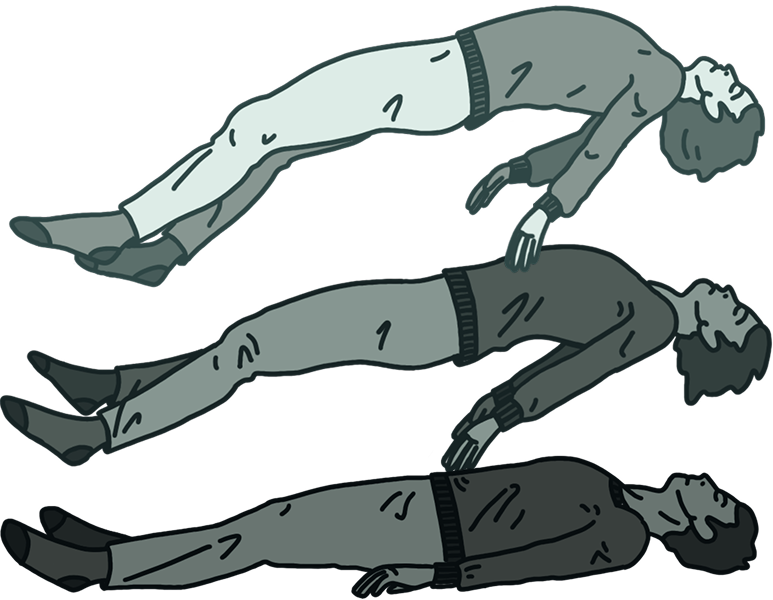
Orion, a 17-year-old fascinated by dreams and the paranormal, experiments with astral projection after frequent episodes of sleep paralysis. During one attempt, he successfully leaves his body – but can't return.
As panic sets in, his once-familiar room twists into a sinister place filled with shadowy entities drawn to his defenseless body. To survive, Orion must uncover clues hidden within the distorted space and confront the fears and self-doubt keeping him trapped.
Gameplay loop
Players continuously explore, investigate their surroundings, and solve puzzles to progress through the story. Each puzzle provides new clues that lead to further exploration until the final objective is reached.

Controls
The player system is built using Unity's Starter Assets FirstPersonController and Cinemachine for movement and camera control. World interaction is based on a center-screen raycast system, allowing players to interact with doors, drawers, mirrors, and other objects.
| Input | Name | Action |
|---|---|---|
|
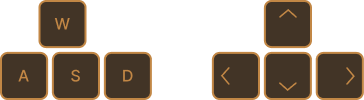
WASD or arrows | Move around |

|
Mouse | Look around / rotate camera |

|
Left mouse button | Object interaction |

|
Space | Toggle rotation mode, when holding an object. Player movement stops, cursor unlocks, and the object can be freely rotated. Press Space again to exit. |

|
Left mouse button and drag | Rotates the object, when holding it |

|
Escape | Toggle pause menu |
Puzzles
Rather than existing independently, each puzzle builds upon the previous one. Players use information gathered from earlier challenges to unlock new puzzles, creating a clear sense of progression throughout the game.
Diary
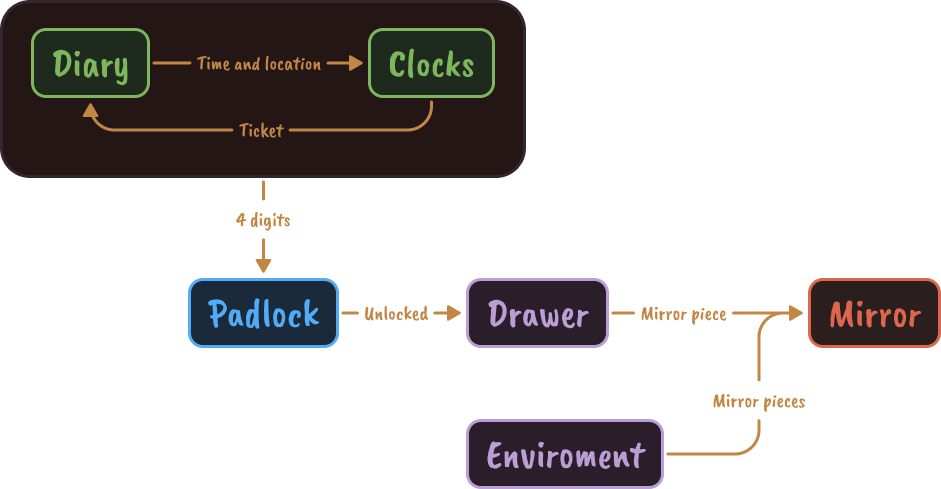
The diary is the game's main storytelling and progression system. Players unlock four memories containing clues about specific times and locations, while collecting tickets that track their puzzle progress.
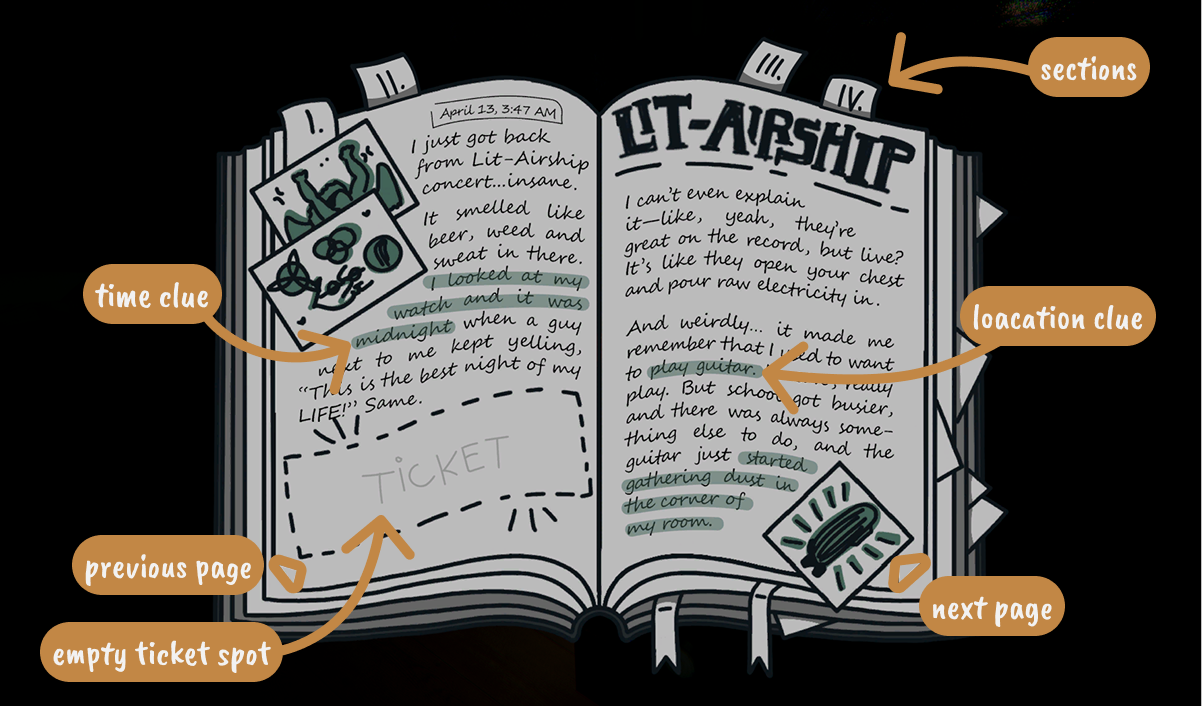
Structure flow
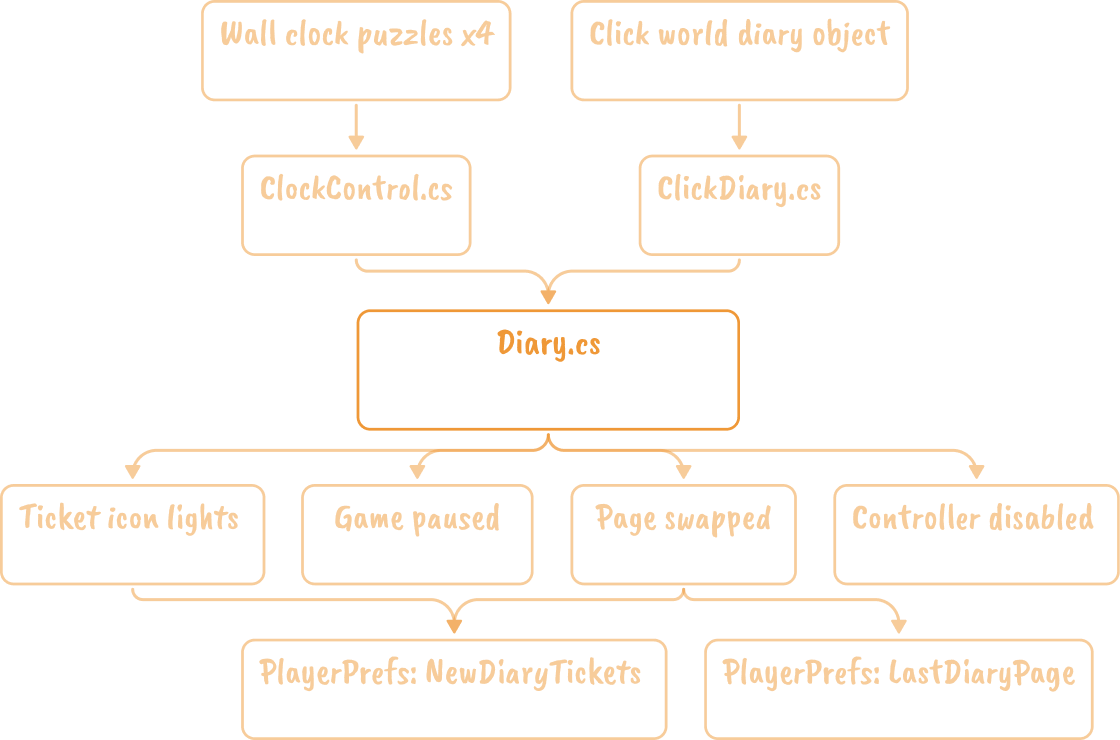
Diary.cs – main controller
Diary.cs serves as the central manager for the diary system. It maintains references to all diary pages and ticket indicators through two Inspector-assigned List<GameObject> collections:
- pages – one GameObject for each diary page.
- tickets – one GameObject for each ticket indicator, mapped to the corresponding page by index.
The system uses a fixed page index (0–3) to identify each memory. References are configured manually in the Unity Inspector rather than through a separate data model.
Runtime state
The controller maintains the following runtime state:
- currentPageIndex – currently active diary page.
- isDiaryOpen – current diary visibility state.
- newTickets (HashSet<int>) – stores unlocked pages that have not yet been viewed, enabling unread ticket indicators.
Core functionality
The controller exposes the following core methods:
- UnlockTicket(int pageIndex) Activates the corresponding ticket, registers it as unread, and enables its notification state.
- ToggleDiary() Opens or closes the diary UI, manages cursor visibility and locking, pauses/resumes gameplay (Time.timeScale), temporarily disables player interaction systems, and restores the previously viewed page.
- GoToPage(int pageIndex) Switches the active diary page, clears the unread state for that page, disables its notification effect, and updates saved progress.
Memory unlock flow
Each wall clock puzzle contains a ClockControl component with an assigned ticketPageIndex.
Once the puzzle reaches its correct solution:
- the completion sequence is triggered,
- success feedback is played,
- Diary.UnlockTicket(ticketPageIndex) is invoked to unlock the associated diary page.
The project also contains an additional unlock call inside Clock.OnPuzzleCompleted(). In the current implementation this field remains at its default value, making the call redundant without affecting gameplay.
Diary interaction
Player interaction with the diary is handled by ClickDiary.cs.
The script continuously performs a center-screen raycast to detect the diary object, validates interaction distance, and controls the outline and interaction prompt. When the player interacts with the diary, the request is forwarded to Diary.ToggleDiary(), provided the pause menu is not currently active.
Navigation between diary pages is handled through UI buttons, each storing a page index and invoking GoToPage() when selected.
Visual feedback
Unread ticket notifications are driven by the reusable BlinkEffect component.
Rather than containing diary-specific logic, the component simply animates either a UI element or a renderer. Diary.cs controls when the effect is enabled or disabled based on each ticket's read state.
Persistence
The diary uses Unity's PlayerPrefs for lightweight persistence.
The following values are stored:
- LastDiaryPage – restores the previously opened page when the diary is reopened.
- NewDiaryTickets – stores unread ticket indices as a serialized comma-separated string, which is reconstructed into a HashSet<int> during initialization.
Clocks
Players solve clock puzzles by matching the correct hour and minute based on clues discovered in the diary. Successfully solving a clock rewards progression by unlocking a diary ticket.
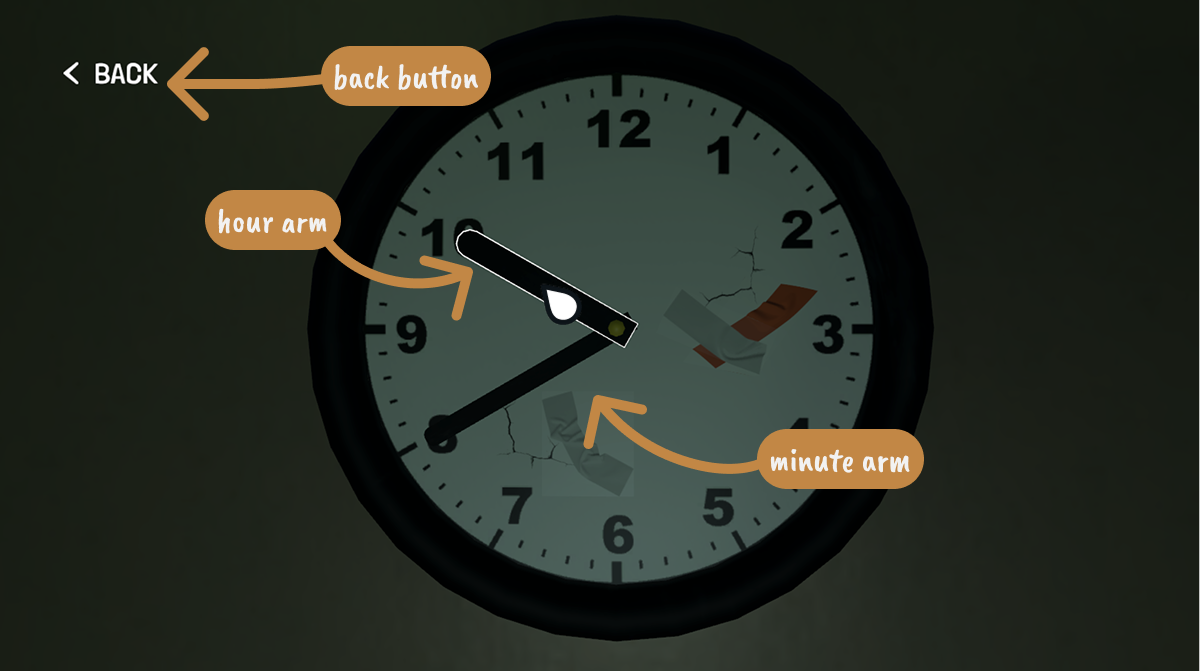
Structure flow
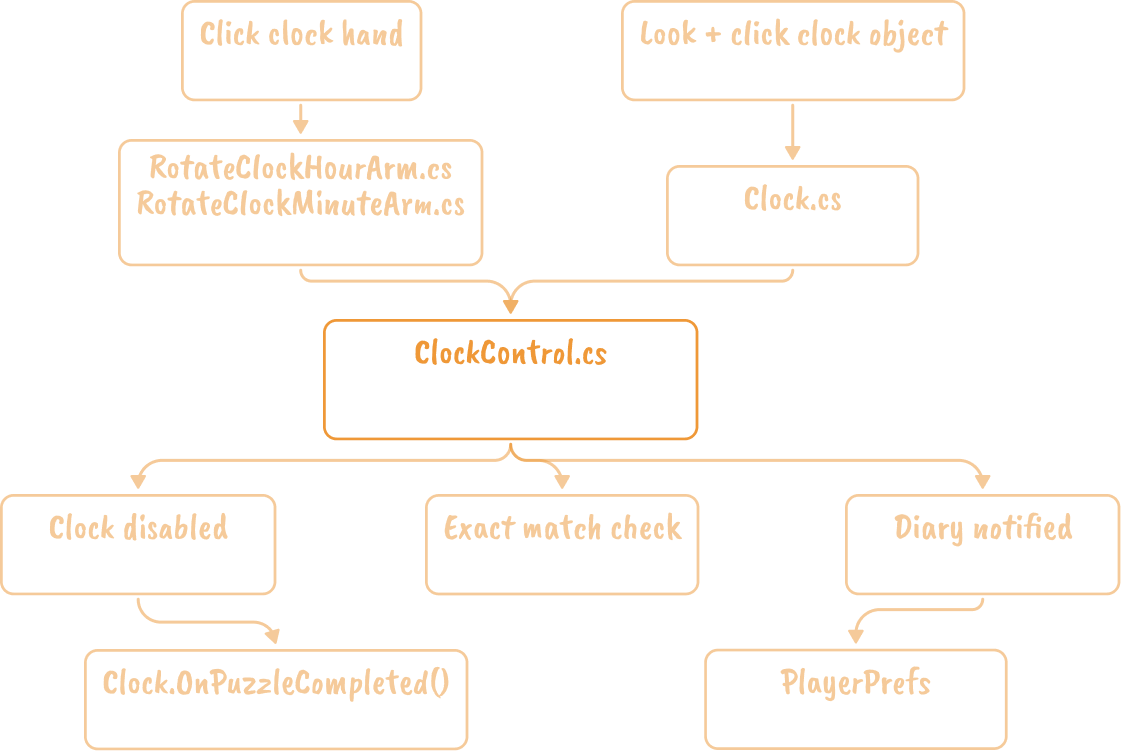
ClockControl.cs – puzzle controller
ClockControl.cs is the state machine for a single wall clock puzzle. It holds the correct time combination for that instance and owns the pass/fail check that runs every time a hand advances. There is no shared manager: each of the four clocks (bathroom, soccer, homework, guitar) is a separately configured instance of the same three scripts, wired entirely through the Inspector rather than spawned or pooled at runtime.
Each instance exposes:
- correctHour, correctMinute — the target combination for this specific clock.
- ticketPageIndex — index into Diary.tickets / Diary.pages, unlocked on solve.
Runtime state
- result[2] — stores what the player has set the clock to right now: result[0] is the minute hand, result[1] is the hour hand. It starts as [-1, -1] since no hand has been touched yet.
- correctCombination[2] — built from correctHour/correctMinute in Start().
Core functionality
- OnArmRotated(string armName, int number) Called by whichever hand script just advanced. Writes into result[0] (minute) or result[1] (hour) depending on armName, then checks for an exact integer match against correctCombination. On a match, calls UnlockClock().
- UnlockClock() (private) Fires the ClockAnimator "Change" trigger, calls ClockScript.OnPuzzleCompleted() and then permanently disables it (ClockScript.enabled = false), restores the default crosshair and locked cursor, calls diary.UnlockTicket(ticketPageIndex), and activates objectToReveal if one is assigned.
Hand rotation & input
RotateClockHourArm.cs and RotateClockMinuteArm.cs are structurally identical scripts, one per hand, differing only in the arm-name string each reports to ClockControl.
Clicking a hand advances it by exactly one discrete step:
- OnMouseDown() starts a RotateWheel() coroutine, guarded by coroutineAllowed so a hand can't be re-triggered mid-animation.
- the hand animates rotationAnglePerClick degrees (default 30°, i.e. one hour-marker) across 12 sub-steps of 0.01s each.
- numberShown increments modulo totalSteps (default 12) and is reported via clockControl.OnArmRotated(...).
There is no drag-to-rotate and no angle tolerance. The mechanic is fully discrete — each click snaps to the next of 12 positions, and correctness is decided by exact integer equality in ClockControl.OnArmRotated, not by proximity to an angle.
Clock interaction & completion
Player interaction with the physical clock object — separate from the hand scripts — is handled by Clock.cs.
The script runs a continuous camera raycast every Update() (HandleRaycastInteraction()) to detect the clock, toggling an Outline on gaze. Clicking while looking at it swaps the Animator into its close-up view ("Change" trigger), hides the default crosshair in favor of a back-button, and unlocks the cursor.
OnBackButtonPressed() reverses this: re-triggers the Animator, restores the crosshair, re-locks the cursor, and calls PauseMenu.RestoreGameplayState() if the pause menu isn't open.
Visual & audio feedback
Clock.OnPuzzleCompleted() plays AudioManager.Instance.good once via PlaySFX(), guarded by a per-instance successSfxPlayed flag so it can't double-fire.
Ticket-blink notifications are not driven by the clock scripts at all — BlinkEffect lives on the diary ticket GameObjects and is switched off inside Diary.UnlockTicket() itself, identically whether the unlock came from a clock or from ClickDiary.
Redundant unlock path: Clock.OnPuzzleCompleted() independently calls diary.UnlockTicket(diaryPageIndexToUnlock) on top of ClockControl.UnlockClock()'s own call. Both default to index 0 unless deliberately configured apart, and UnlockTicket() is idempotent — so the duplication is harmless today, but worth resolving before adding a fifth clock.
Persistence
None of the clock scripts read or write PlayerPrefs. A solved clock's state survives only as far as Unity's normal scene-saved GameObject data.
- result[] and hand rotation reset to their defaults ([-1,-1] / initialValue) on every Start().
- whether a reward stays revealed or a clock stays disabled depends entirely on that object's serialized active state, not an explicit save flag.
- the only persisted trace of a solve is indirect, via Diary's NewDiaryTickets PlayerPrefs entry — it marks a ticket unread, it does not record which clocks were solved.
Padlock
The padlock combines the solutions from all four clock puzzles into a single digit code. Once the correct combination is entered the drawer can be opened.

Padlock
State & fields
| VARIABLE(S) | TYPE | PURPOSE |
|---|---|---|
playerCamera, interactRange |
Transform float | Detect player interaction using raycasts |
outline |
Outline | Highlights the padlock when it can be interacted with |
padlockAnimator |
Animator | Controls transitions into and out of puzzle mode |
defaultCrosshairUI, backButtonUI |
GameObject | Switch between gameplay UI and puzzle UI |
isLookingAtPadlock, isInteractingWithPadlock
|
bool | Track the current interaction state |
IsPadlockInteractionActive |
static bool | Global flag indicating that the padlock puzzle is currently active |
HandleRaycastInteraction()
- Detect the padlock.
- Highlight it with an outline.
- Enter padlock mode.
- Play the opening animation.
- Hide the gameplay UI, display back button and cursor.
- Remove the outline.
- Return the padlock to its default state.
OnBackButtonPressed()
- Exit padlock mode.
- Play the closing animation.
- Restore the gameplay UI.
- Restore player controls.
Rotate wheels
State & fields
| VARIABLE(S) | TYPE | PURPOSE |
|---|---|---|
couroutineAllowed |
bool | Prevents the wheel from rotating multiple times simultaneously |
numberShown |
int | Stores the currently selected digit |
outline |
Outline | Highlights the wheel when hovered |
Rotated |
Action<string, int> | Broadcasts the updated wheel value to the lock controller |
RotateWheel()
- Prevent additional rotations while the animation is playing.
- Rotate the wheel to the next number.
- Update the displayed digit.
- Wrap from 9 → 0 when necessary.
- Notify the padlock controller of the new value.
Mirror
The mirror acts as the player's primary goal. As mirror pieces are discovered, players return to the mirror to place them into the correct slots, gradually rebuilding it until the final scene is unlocked.
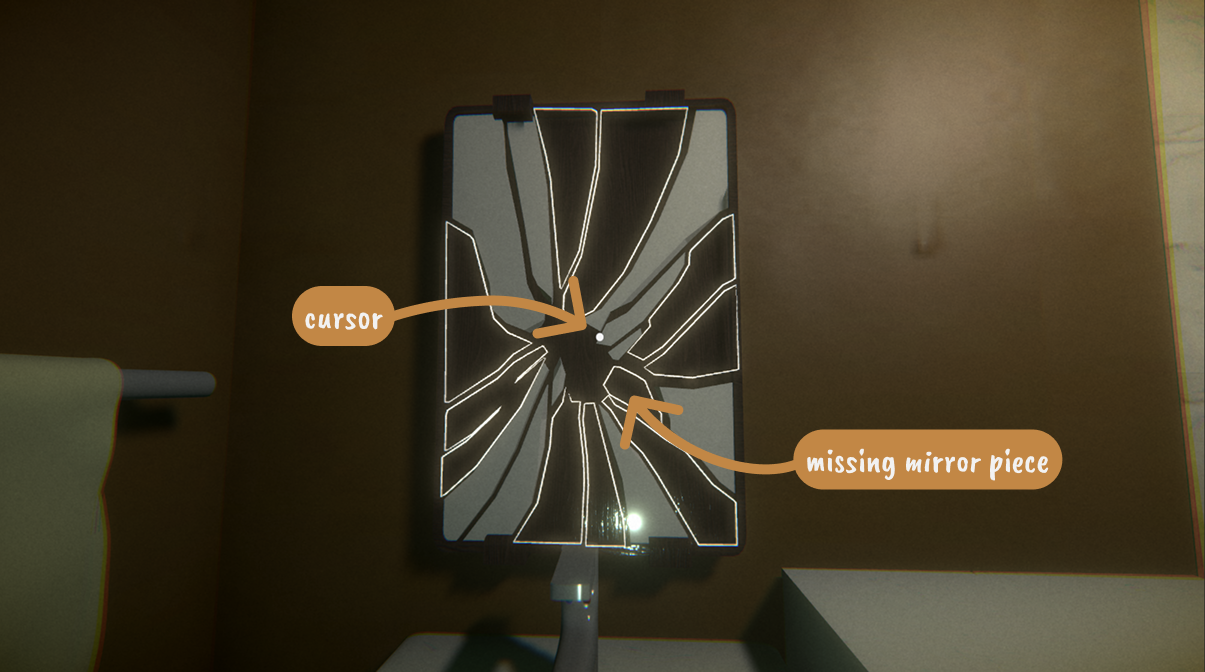
Missing mirror piece
State & fields
| VARIABLE(S) | TYPE | PURPOSE |
|---|---|---|
outline |
Outline | Highlights the socket when the mirror is targeted. |
holdPos |
Transform | Reference point for snapping objects. |
correctHeldObject |
GameObject | The mirror piece accepted by this socket. |
Manager |
MissingMirrorManager | Reference to the central mirror manager. |
TrySnapHeldObject()
- Check if the player is holding a mirror piece.
- Attempt to match it with the correct socket.
- If valid, snap the piece into place.
SnapThisHere()
- Remove the mirror piece from the player's hand.
- Snap it into its correct position.
- Disable physics and further interaction.
- Notify the manager that the piece has been placed.
- Remove the empty socket placeholder.
Mirror
State & fields
| VARIABLE(S) | TYPE | PURPOSE |
|---|---|---|
AllPieces |
List<MissingMirrorPiece> | Stores every remaining mirror socket. |
mirrorPieces |
List<MissingMirrorPiece> | Tracks pieces still required to complete the mirror. |
byCorrect |
Dictionary<GameObject, MissingMirrorPiece> | Maps each mirror piece to its correct socket. |
playerHold |
Transform | Reference to the player's held object. |
cam, interactDistance |
Camera float | Detect interaction with the mirror. |
interactKey |
KeyCode | Input used to place a mirror piece. |
endCreditsSceneName |
string | Scene loaded after all pieces are placed. |
Awake()
- Initialize the mirror manager.
- Find every mirror socket in the scene.
- Build the mirror piece lookup table.
Update()
- Detect when the player is looking at the mirror.
- Highlight all available mirror sockets.
- Check if the player is holding a mirror piece.
- Attempt to place it into the correct socket.
- Remove all socket highlights.
RefreshPiecesAndMap()
- Find every mirror socket.
- Register each socket with the manager.
- Create a lookup between mirror pieces and sockets.
TrySnapFromAnyHeld()
- Check whether the player is holding a mirror piece.
- Attempt to place the held object.
TrySnapSpecific()
- Find the correct socket for the held mirror piece.
- Place it if a valid match exists.
NotifyPiecePlaced()
- Remove the completed socket from the active list.
- Update the remaining piece count.
- Load the ending scene once all pieces have been placed.